
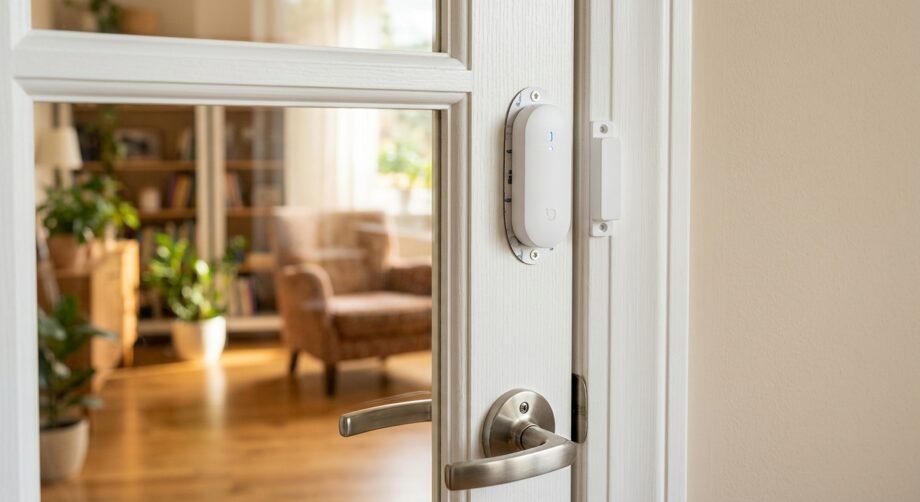
An alarm window and door contact sensor detects whether a door or window is open or closed by tracking the position of a sensor and magnet. Depending on the model, it can trigger an alarm, send app alerts, or start smart-home automations through a compatible hub or platform.
- What Is an Alarm Window and Door Contact Sensor?
- How Does an Alarm Window and Door Contact Sensor Work?
- Wired vs Wireless Door and Window Contact Sensors
- Alarm Window and Door Contact Sensor Compatibility
- What to Check Before Buying a Contact Sensor
- How to Install a Door or Window Contact Sensor
- Step 1: Pair or Enroll the Sensor First
- Step 2: Plan the Sensor and Magnet Positions
- Step 3: Check Alignment and Clearance
- Step 4: Clean the Mounting Surface
- Step 5: Attach the Sensor Securely
- Step 6: Test Open and Closed States
- Useful Places for Contact Sensors
- Smart-Home Automations You Can Build
- Turn Lights On When a Door Opens
- Adjust Heating When a Window Opens
- Send an Open-Door Alert
- Trigger Security Actions
- What Happens If Wi-Fi or the Internet Goes Down?
- Common Contact Sensor Problems and How to Fix Them
- Common Installation Mistakes to Avoid
- Alarm Sensor vs Smart-Home Contact Sensor
- Quick Contact Sensor Feature Checklist
- Frequently Asked Questions
- Final Verdict: Choose Compatibility Before Features
A contact sensor looks simple, but choosing the right one can get confusing quickly. The real questions are usually not about the magnet itself—they are about hub requirements, wireless protocols, alarm-system compatibility, installation, and what still works if your internet connection fails.
People shopping for these devices also commonly compare wired and wireless models, replacement sensors, and Ring-specific options.
The safest buying approach is to start with the system you already own and work backward from there.
What Is an Alarm Window and Door Contact Sensor?
A door or window contact sensor monitors whether an entry point is open or closed. Most designs use two nearby pieces: a sensor body and a magnet.
Traditional security contacts often use a magnetic reed switch. When the magnet moves far enough away, the switch changes state and the alarm system can treat the opening as an event. Bosch documents this design in its door/window contacts, while newer products such as the Aqara Door and Window Sensor P2 use a Hall sensor instead.
The basic job remains the same: detect a change between “closed” and “open.”
Depending on the system, that change can be used to:
- trigger an intrusion alarm;
- send a phone notification;
- update the door or window status in an app;
- start a smart-home automation;
- record an opening event;
- trigger another compatible device.
For example, Ring states that its Contact Sensor can notify the user or trigger the alarm according to system settings, while Aqara shows door/window sensors being used as automation triggers.
Contact Sensor vs Motion Sensor vs Glass-Break Sensor
These devices solve different security problems.
| Sensor Type | What It Detects | Typical Role |
| Contact sensor | A door or window changing between open and closed | Entry-point monitoring |
| Motion sensor | Movement within a protected space | Room or hallway coverage |
| Glass-break sensor | Characteristics associated with breaking glass | Additional window protection |
A contact sensor only knows the state of the opening it monitors. It does not replace every other type of intrusion sensor.
How Does an Alarm Window and Door Contact Sensor Work?
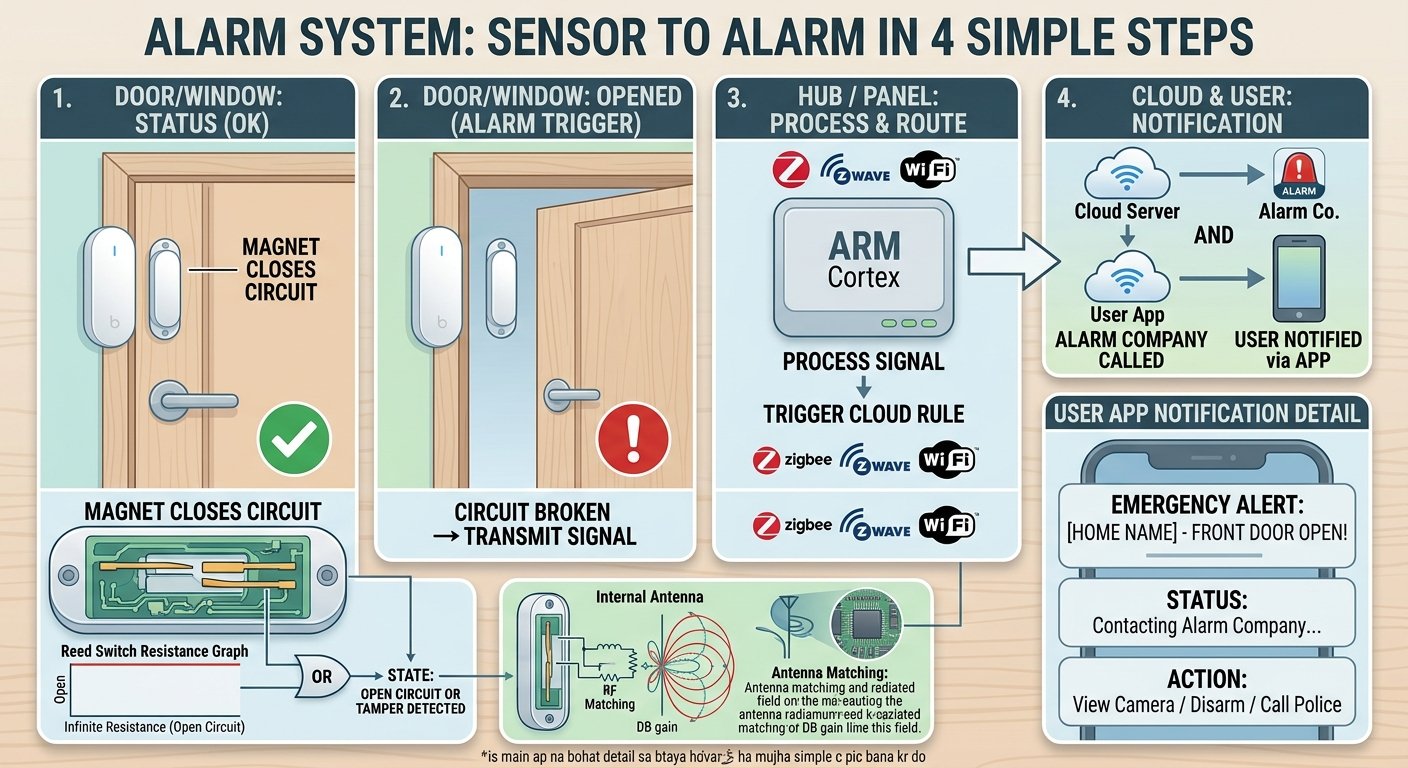
A typical detection chain looks like this:
Door or window opens → magnet moves away → sensor changes state → alarm panel or smart-home system receives the event → an alert, alarm, or automation may run.
That sounds straightforward, but the communication step varies significantly between products.
Magnetic Detection
In a reed-switch design, the magnet influences an internal switch while the door or window is closed. Once the magnet moves beyond the permitted operating distance, the state changes.
Bosch, for example, documents wireless door/window contacts in which a magnetic reed switch reports an alarm condition when the magnet moves beyond the specified distance.
Not every modern sensor uses a reed switch. Aqara’s P2 instead uses a Hall sensor while still performing the same basic open/closed detection role.
What the Hub or Base Station Does
Many wireless contact sensors do not communicate directly with your phone.
Instead, the sensor communicates with a hub, alarm base station, controller, or Thread Border Router. That infrastructure can then expose the sensor to an app, security system, or smart-home platform.
For example:
- Ring’s Contact Sensor uses Z-Wave and requires a Ring Alarm Base Station.
- Aqara’s classic Door and Window Sensor uses Zigbee and requires an Aqara Hub.
- Eve Door & Window uses Thread and requires a compatible hub with Matter Controller and Thread Border Router functionality.
This is why seeing “Alexa compatible,” “Apple Home compatible,” or “Matter compatible” on a product page is not enough. You also need to check what hardware sits between the sensor and that ecosystem.
Does a Contact Sensor Need Wi-Fi?
Not necessarily.
Ring’s sensor communicates with its base station over Z-Wave, the classic Aqara sensor uses Zigbee, and Eve Door & Window uses Thread. The hub or controller may then use Ethernet or Wi-Fi for broader network and internet connectivity.
This distinction matters during setup and troubleshooting. A sensor can have a healthy connection to its hub even though your home internet is unavailable, although remote access and notifications may behave differently.
Wired vs Wireless Door and Window Contact Sensors
Both designs remain useful, but they fit different installations.
A wired contact physically connects to an alarm control panel. Resideo, for example, sells recessed magnetic contacts specifically designed to connect to a wired alarm control panel.
Wireless models use a radio connection and generally rely on a battery-powered transmitter, as seen in Ring, Aqara, Bosch, and other current systems.
| Feature | Wired Contact Sensor | Wireless Contact Sensor |
| Connection | Physical wiring to compatible alarm equipment | Radio connection to compatible hub or receiver |
| Battery at sensor | Usually unnecessary for a basic wired magnetic contact | Common |
| Retrofit difficulty | Can require cable routing | Usually easier |
| Hub/protocol concerns | Primarily alarm-panel compatibility | Protocol and hub compatibility are critical |
| Maintenance | Little sensor-side battery maintenance | Batteries eventually need replacement |
| Best fit | Existing wired alarm systems or planned construction | DIY smart homes and easier retrofits |
When Wired Makes More Sense
A wired sensor can be attractive when a property already has alarm wiring or when permanent low-voltage cabling is being installed during construction or renovation.
It also avoids routine battery replacement at a simple magnetic contact.
However, adding new wiring through finished walls and frames can make retrofits more involved. If the work interfaces with an existing security panel and you are not familiar with alarm wiring, follow the panel manufacturer’s instructions or use a qualified alarm installer.
When Wireless Makes More Sense
Wireless contact sensors are often easier to add to an existing home because they do not need a cable run between every opening and the alarm panel.
The tradeoff is that you must pay much closer attention to:
- radio protocol;
- required hub;
- signal strength;
- battery condition;
- ecosystem support;
- range and interference.
Alarm Window and Door Contact Sensor Compatibility
Compatibility is the most important thing to check before you buy.
Two sensors can perform exactly the same basic job while being unusable with each other’s hubs.
Z-Wave and Ring Alarm
Ring’s current Contact Sensor (2nd Gen) is Z-Wave enabled and requires a Ring Alarm Base Station. Ring lists compatibility with Ring Alarm devices and accessories, and its support documentation identifies the Base Station as required hardware.
That means you should not buy a Ring contact sensor simply because you want a generic Z-Wave door sensor. Buy it because you intend to use it within the supported Ring Alarm environment.
Zigbee Sensors
Aqara’s classic Door and Window Sensor uses Zigbee and officially requires an Aqara Hub. Aqara lists support for platforms including Apple Home and Alexa through its supported hub setup.
The broader lesson is important: Zigbee does not automatically mean universal hub compatibility.
Always check the exact device-and-hub combination, not just the protocol logo.
Matter over Thread
Matter and Thread reduce some ecosystem fragmentation, but they do not eliminate infrastructure requirements.
A Thread device needs access to the rest of the local IP network through a Thread Border Router. The Connectivity Standards Alliance describes the Border Router as the component that connects Thread devices to the local network and other IP-based devices.
Aqara’s Door and Window Sensor P2 requires a Matter-compatible Thread Border Router for use with a Matter ecosystem. Aqara lists support across platforms such as Apple Home, Google Home, Amazon Alexa, and SmartThings, with functionality varying by ecosystem.
Eve Door & Window similarly requires a compatible hub that provides both Matter Controller and Thread Border Router functionality.
Apple Home, Alexa, Google Home, and SmartThings
Platform compatibility should always be checked separately from the radio protocol.
A useful mental model is:
Sensor → wireless protocol → hub/controller → smart-home platform
With Matter over Thread, some hardware can fill more than one role. A compatible smart speaker or hub, for example, may act as both a Matter Controller and Thread Border Router. The important part is that your actual hardware provides the roles the sensor requires.
What to Check Before Buying a Contact Sensor
Use this checklist before ordering.
- Your Existing Alarm or Smart-Home System
Start with what you already own.
If you have Ring Alarm, a Ring sensor is designed around that system. If you have an Aqara Zigbee setup, confirm that the particular sensor supports your Aqara hub. For Matter-over-Thread products, check your controller and Thread Border Router.
- The Wireless Protocol
Look for:
- Z-Wave;
- Zigbee;
- Thread;
- proprietary wireless technology;
- wired alarm-panel connections.
Do not assume devices using the same general technology are automatically interchangeable.
- Required Hub or Controller
A low-priced sensor can become a poor purchase if you later discover that it needs additional hardware you do not own.
Confirm whether the product requires:
- a dedicated alarm base station;
- a Zigbee hub;
- a Matter Controller;
- a Thread Border Router;
- a proprietary receiver.
- Your Door or Window Design
Look closely at the mounting surface before buying.
Potential trouble spots include:
- deep trim;
- recessed frames;
- narrow frames;
- curved moulding;
- sliding doors;
- metal doors;
- aluminum frames.
Ring specifically warns that metal doors and aluminum frames can interfere with the wireless signal and provides alternate positioning guidance for unusual frames.
- Maximum Magnet Gap
The permitted distance between the magnet and sensor is product-specific.
For Ring’s Contact Sensor (2nd Gen), Ring specifies a maximum gap of 2.5 cm, or 1 inch. Its first-generation sensor has a smaller specified gap.
Other products have different limits, so use the installation guide for the exact model you own.
- What You Want the Sensor to Do
Decide whether your priority is:
- monitored security;
- local alarm triggering;
- phone notifications;
- lighting automations;
- HVAC automations;
- entry logging;
- simple open/closed status.
That decision can narrow the field faster than comparing battery specifications.
How to Install a Door or Window Contact Sensor
Installation varies by manufacturer, but the following sequence prevents many common mistakes.
Step 1: Pair or Enroll the Sensor First
Complete the manufacturer’s setup process before permanently attaching the device.
Ring specifically recommends testing the sensor before securing it to the surface.
That gives you a chance to catch pairing, range, or compatibility problems before adhesive is involved.
Step 2: Plan the Sensor and Magnet Positions
A common arrangement places the main sensor on the fixed frame and the magnet on the moving door or window.
The important part is not which half is visually more convenient. It is whether the two pieces stay within the manufacturer’s specified alignment and gap when closed.
Step 3: Check Alignment and Clearance
Close the door or window and confirm that:
- the two pieces align properly;
- the gap remains within specification;
- the door or window can move freely;
- the battery cover remains accessible.
Ring advises keeping its 2nd-generation sensor within 2.5 cm of the magnet, avoiding the hinge side, and leaving enough clearance to remove the sensor for battery replacement.
Step 4: Clean the Mounting Surface
Adhesive-backed sensors need a clean, suitable surface.
Follow the mounting instructions supplied with the product, particularly if the manufacturer specifies surface preparation or curing time.
Step 5: Attach the Sensor Securely
Use the provided adhesive or supported mounting hardware.
Do not improvise with drilling or screws unless the product documentation allows it, especially around window frames where hidden hardware, seals, or glass may be nearby.
Step 6: Test Open and Closed States
Open and close the door or window several times.
Confirm that:
- the app reports the correct state;
- the alarm panel sees the sensor;
- the device remains online;
- any configured alerts arrive;
- intended automations run.
Do this before considering the installation finished.
Useful Places for Contact Sensors
Doors and windows are the obvious locations, but open/close sensors can also be useful on other moving objects when the device’s environmental specifications allow it.
Aqara demonstrates its P2 on doors, windows, refrigerators, safety boxes, and other objects, while its documentation describes the sensor as suitable for detecting changes on items such as drawers and closets.
Possible uses include:
- front and back doors;
- patio doors;
- accessible windows;
- garage access doors;
- storage cabinets;
- utility closets;
- drawers;
- indoor refrigerator or freezer doors where the manufacturer’s operating conditions permit.
Do not assume an indoor sensor can be installed outdoors. Ring, for example, specifies indoor use for its standard Contact Sensor (2nd Gen).
Smart-Home Automations You Can Build
A contact sensor becomes much more useful when its open/closed state can trigger other devices.
Turn Lights On When a Door Opens
Aqara specifically demonstrates an automation in which opening a door triggers lighting through compatible Aqara equipment.
A similar concept can be built in other platforms when both the sensor and lighting device are exposed as supported automation accessories.
Adjust Heating When a Window Opens
Eve describes Door & Window as suitable for contact-based automations involving lighting, heating, and other smart-home functions.
This type of routine can help avoid heating a room while a window is intentionally open, provided your thermostat and platform support the necessary automation.
Send an Open-Door Alert
Security ecosystems can use a sensor event to produce a notification.
Ring states that its Contact Sensor can send notifications when an opening is detected, subject to the user’s configuration.
Trigger Security Actions
Within a supported alarm system, an entry sensor can be part of the armed security logic.
The exact response depends on system mode, sensor configuration, entry delay rules, and monitoring setup, so use the alarm manufacturer’s settings rather than assuming every opening should trigger an immediate siren.
What Happens If Wi-Fi or the Internet Goes Down?
This is where the distinction between sensor communication and internet communication becomes useful.
A Zigbee, Z-Wave, or Thread sensor does not necessarily depend on direct Wi-Fi access for its connection to the local hub or network.
What happens next depends on the ecosystem.
Local Sensor Detection May Continue
Matter is designed around local IP connectivity, and Eve states that its Matter products can operate locally without an Eve cloud.
Traditional alarm systems may also preserve core local protection even when internet access disappears.
Ring, for example, states that if its Base Station loses internet access, the alarm remains armed and the siren can still function, although app access can be unavailable in that offline state.
Remote Features May Behave Differently
Phone notifications, remote control, cloud automations, monitoring, and backup connectivity depend on the platform and subscription configuration.
That means you should never assume that “works without Wi-Fi” means every feature works exactly the same without internet.
Check three things separately:
- Does the sensor still communicate locally?
- Does the alarm or automation still run locally?
- Can you still receive or send information remotely?
Common Contact Sensor Problems and How to Fix Them
Contact sensors are simple devices, so troubleshooting usually starts with a few repeatable checks.
Sensor Says Open When the Door Is Closed
Check the physical relationship between the magnet and sensor first.
Ring specifically recommends checking sensor/magnet alignment when a contact sensor reports incorrectly.
Look for:
- a magnet that shifted;
- adhesive that slipped;
- a gap that became too large;
- incorrect orientation;
- a loose mounting surface.
Sensor Is Unresponsive
Check its battery and connection.
Ring’s troubleshooting guidance recommends reinserting the batteries, replacing them if the sensor shows no response, and retrying the connection to the Base Station when necessary.
For another ecosystem, follow the equivalent manufacturer procedure rather than applying Ring-specific reset instructions.
Sensor Keeps Going Offline
Distance and signal quality are likely places to investigate.
Ring recommends moving an affected sensor closer to the Base Station as a diagnostic test. If the connection improves, the company suggests a more central Base Station location or an appropriate range extender.
Metal surfaces can also affect radio propagation. Both Ring and Bosch caution about metal installation conditions for wireless contacts.
Notifications Are Delayed
First determine whether the sensor itself is reporting late or whether only the remote notification is late.
Check:
- whether the app immediately changes from closed to open;
- hub connectivity;
- home internet status;
- automation platform status;
- phone notification permissions.
If the local state updates correctly but the phone alert arrives later, the problem may be downstream of the sensor.
Sensor Shows a Tamper Warning
Some security sensors have tamper detection that responds when the enclosure or device is disturbed.
Ring’s sensors can report a tamper condition when the device cover or mounting state changes, and Ring provides a specific troubleshooting process for clearing that status.
Adhesive Keeps Coming Loose
Do not keep remounting the sensor without checking the surface and manufacturer’s mounting instructions.
Make sure the location is suitable for adhesive installation, and use approved replacement mounting materials where available.
Common Installation Mistakes to Avoid
A few errors cause a disproportionate number of problems:
- Buying by protocol alone. Zigbee, Z-Wave, or Thread support does not guarantee compatibility with your hub.
- Mounting before testing. Verify pairing and signal quality first.
- Ignoring magnet distance. Every sensor has an operating gap.
- Blocking the battery cover. Leave room for future maintenance.
- Using the hinge side without checking guidance. Ring specifically advises against hinge-side placement for its Contact Sensors.
- Ignoring metal frames. Wireless signal behavior can change around metal.
- Assuming internet failure equals alarm failure. Local and remote functions can behave differently.
- Assuming every contact sensor is a complete security system. Some are automation accessories rather than monitored alarm components.
Alarm Sensor vs Smart-Home Contact Sensor
There is substantial overlap between the two categories, but their priorities are different.
| Requirement | Alarm-System Contact Sensor | Smart-Home Contact Sensor |
| Open/closed detection | Yes | Yes |
| Intrusion-system integration | Core use | Product dependent |
| Professional monitoring | May be supported through alarm system | Not inherent |
| Automation triggers | Often available | Common |
| Dedicated hub/base station | Frequently required | Depends on platform |
| Mobile status/alerts | Common in connected systems | Common |
| Security behavior during outages | System specific | Platform specific |
If your main goal is burglary protection, choose the sensor as part of the security system, not as an isolated gadget.
If your main goal is automation, focus more heavily on platform support, local control, and integration with the devices you want to trigger.
Quick Contact Sensor Feature Checklist
Before buying, confirm:
- Wired or wireless design
- Compatible alarm system
- Required hub or base station
- Z-Wave, Zigbee, Thread, or proprietary protocol
- Matter support if required
- Matter Controller requirement
- Thread Border Router requirement
- Apple Home compatibility
- Alexa compatibility
- Google Home compatibility
- SmartThings compatibility
- Maximum sensor-to-magnet gap
- Battery type for wireless models
- Battery-status reporting
- Mounting clearance
- Indoor or outdoor rating
- Local/offline behavior
- Automation support
- Remote notification requirements
Frequently Asked Questions
What is a door contact sensor?
A door contact sensor is a device that detects whether a door is open or closed, usually by monitoring the position of a magnet relative to a sensor. The resulting state can be used by an alarm system, app, or smart-home automation.
What are the best door and window sensors?
There is no single sensor that is best for every home. The right option depends mainly on the system you already use.
A Ring Alarm household should prioritize officially supported Ring sensors. A Zigbee-based Aqara setup should use sensors compatible with its Aqara hub. A Matter-focused household may prefer a Matter-over-Thread sensor such as Aqara P2 or Eve Door & Window if the required Matter Controller and Thread Border Router are already available.
Does a door contact sensor work without Wi-Fi?
Many do not use Wi-Fi for the sensor-to-hub connection. Z-Wave, Zigbee, and Thread sensors use their respective radio networks instead. However, internet loss can affect remote app access, notifications, monitoring, or cloud-dependent automations.
Can I use a contact sensor without an alarm system?
Some smart-home contact sensors can be used primarily for automation and status monitoring rather than as part of a traditional alarm system. Matter-enabled Eve Door & Window, for example, operates through compatible Matter/Thread smart-home infrastructure rather than requiring a dedicated burglary-alarm base station.
By contrast, Ring’s Contact Sensor is designed for Ring Alarm and requires its Base Station.
Why does my door sensor say open when the door is closed?
Misalignment or an excessive gap between the sensor and magnet is a common first thing to check. Ring specifically directs users with inaccurate open/closed reporting to verify the alignment of the sensor and magnet.
Can a contact sensor trigger Alexa, Google Home, or other automations?
Yes, if the sensor and its required hub or controller expose the device to a compatible automation platform.
Aqara’s Matter-over-Thread P2 supports major Matter ecosystems including Apple Home, Google Home, Alexa, and SmartThings, although available automation features can vary between ecosystems.
How long do wireless door sensor batteries last?
There is no universal battery-life figure because designs and usage conditions vary.
As one current example, Ring rates its Contact Sensor (2nd Gen) for up to three years from two CR2032 batteries depending on usage, and it notes that colder temperatures can reduce battery life.
Always use the specification for the exact model rather than applying one manufacturer’s estimate to another sensor.
Final Verdict: Choose Compatibility Before Features
A contact sensor performs a simple task, but the system around it determines how useful it will be.
Before buying, identify your alarm or smart-home platform, confirm the communication protocol, check whether a hub or Thread Border Router is required, measure the available mounting space, and decide whether you need security monitoring, simple notifications, automation, or a combination of those functions.
The right alarm window and door contact sensor is the one that fits your existing ecosystem and reliably performs the job you actually need. A longer feature list cannot compensate for an incompatible hub, poor mounting position, or unsupported automation platform.
Disclaimer
Smart-home and alarm compatibility can vary by product generation, hub, region, firmware, and platform configuration. Always follow the current manufacturer instructions for pairing, placement, wiring, batteries, and security-system setup, and use a qualified alarm professional when an installation requires changes to existing security wiring.